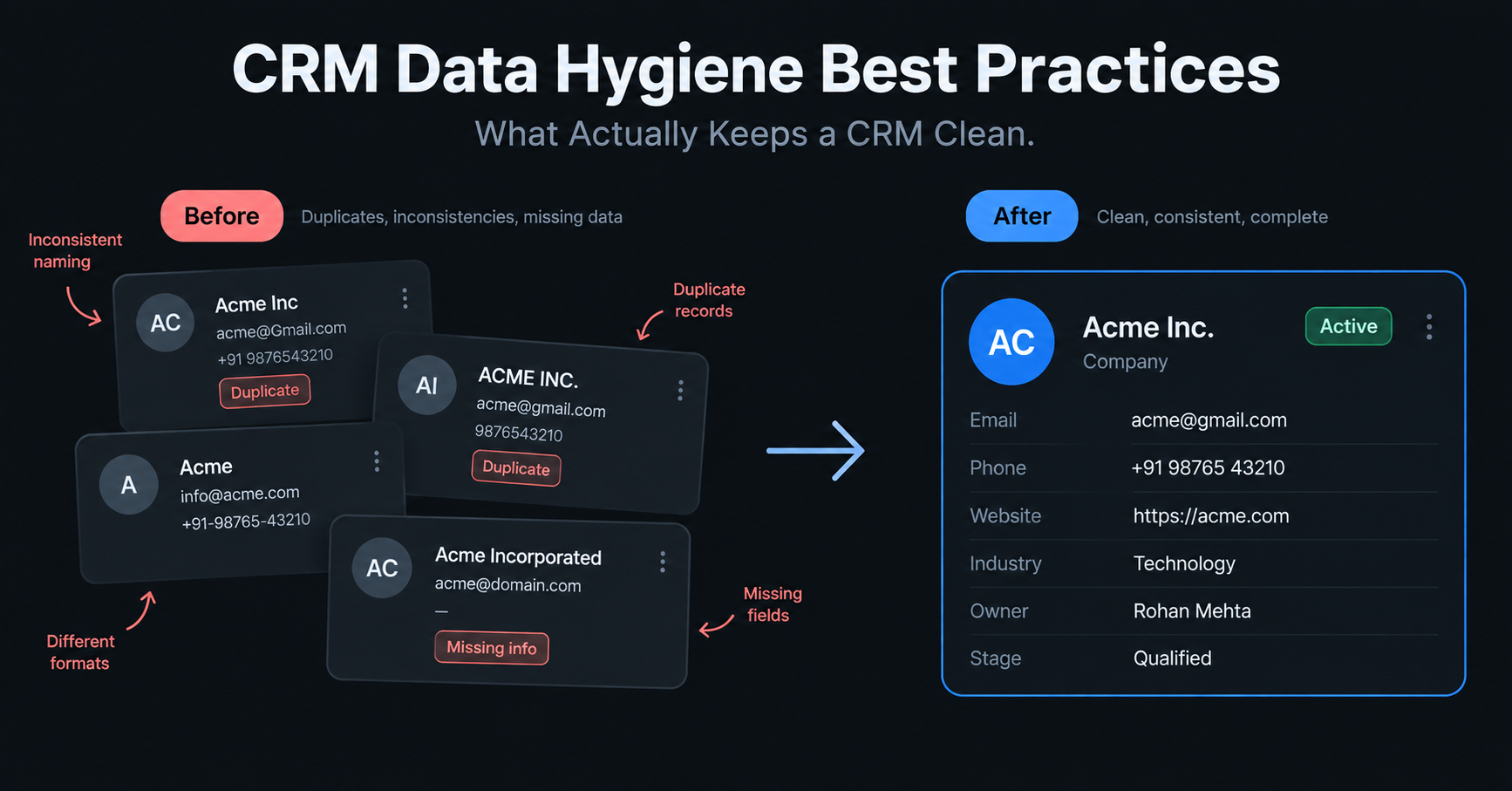
A CRM can be full of records and still be nearly useless. Here is a simple example—if contacts are duplicated, job titles are inconsistent, and essential fields are empty, your sales team is still working with assumptions and not your customer data.
CRM data hygiene involves the ongoing process of ensuring your records are up-to-date and accurate, with robust, complete data. Gartner estimated that poor data quality costs organizations an average of $12.9 million a year. But that figure came from a 2020 survey of large enterprises already investing in data-quality software, so treat it as a sign of scale—not a number every company should expect to hit.
This process seems straightforward until you try to sustain it. A single duplicate lead is double touched, a stale email is silently bouncing an actual prospect, and an out-of-date report results in the team rushing to conclusions based on numbers they shouldn't trust. And the longer these issues stay in your CRM, the more costly they are to fix.In this guide, we will clarify the true meaning of CRM data hygiene, reveal the hidden challenges of maintaining pristine data, discuss the rapid deterioration of data (the 30% annual decline often cited by sales and marketing experts is misleading), and offer tips on how to audit your CRM without a lengthy cleanup process.
What is CRM data hygiene?
The tasks themselves are unglamorous: merge the duplicate, fix the date format, fill in the missing owner field, and archive the deal that closed two years ago. None of it is hard on its own. Skip it for a few quarters, and all of it becomes a project.
Data hygiene is a continuous process within your CRM to keep data current, accurate, consistent, and complete. Data hygiene incorporates all the positive practices like preventing dirty data from entering your system, cleansing and deleting erroneous data, and deactivating or archiving duplicate records.
What are the best practices for keeping a CRM clean?
- Standardize entry at the source. Give people a dropdown menu to pick from instead of a blank box to type in. When everyone has to choose from the same list, you stop getting five different ways of writing the same thing.
- Validate before the record moves anywhere. Check that everything looks right the moment it's entered, not later. Catch a bad email or a missing field right away, before it’s used in a campaign or appears in a report.
- Deduplicate continuously, not quarterly. Look for duplicate entries all the time, not just once every three months. Some tools can spot near-matches too, like "Jon Smith" and "John Smith. "If you only check once a quarter, the mess just keeps growing until then.
- Assign clear ownership. Pick one person to be in charge of the rules, how names are written, what each field means, and how duplicates get merged. Without one person owning this, every team ends up doing it their own way.
- Automate capture where you can. Let the system log emails and meetings on its own instead of asking people to type them in. Most missing data happens simply because someone forgot to enter it; automation removes that problem entirely.
- Audit on a defined cadence. Don't wait until something looks broken to check your data. Set a regular schedule, like once a month, to look at a small sample and catch problems while they're still small and easy to fix.
- Enrich from outside sources, but validate what comes back. It's fine to pull in extra details from outside tools to fill gaps in your data. But treat that new information the same way you'd treat anything typed in by hand; check it before you trust it.
- Set a data sunset policy. Decide on a rule like this: if a contact hasn't done anything in 18 to 24 months, archive or remove it. A smaller list full of real, active contacts is more useful than a huge list full of dead ones.
- Train the team on what clean looks like. Most messy data comes from a few repeated habits, not random mistakes. Show new team members real examples; this is good, this is bad, so they can actually see the difference, instead of just handing them a rulebook nobody reads.
How is hygiene different from cleansing, enrichment, and governance?
These four words are used interchangeably, and as a result, that's often how a team finds itself addressing the wrong issue.
| Term | What it actually does | When it happens |
|---|---|---|
| Cleansing | Fixes records that are already broken: duplicates, bad formatting, dead entries | Reactive, usually a one-time project |
| Enrichment | Adds missing detail to a record: title, phone number, company size | At intake or after capture |
| Governance | Sets the rules: required fields, approved values, who owns what | An ongoing control layer |
| Hygiene | The outcome of the other three working together over time | Continuous |
Cleansing without governance is only going to cleanse the same mess next quarter. Enrichment without validation only adds richness to data that is neither verified nor validated. Cleanliness comes when all three are in place.
Why does CRM data hygiene matter?
Every workflow that depends on the CRM inherits whatever state the data is in. Routing rules send leads to the wrong rep. Duplicate records inflate pipeline counts and confuse who owns what. Forecasts get built on numbers nobody's confident in, and eventually leadership starts arguing about the data instead of acting on it.
The deeper cost is trust. Once a sales or ops team stops believing the CRM, they build their own spreadsheet on the side. That spreadsheet becomes the real system of record, and now there are two sources of truth instead of one, which is a worse problem than the one hygiene was supposed to solve.
How much does CRM data actually decay, and can the "30% a year" figure be trusted?
Every article on this topic repeats: A third of CRM data is stale every year. The statistic is so often repeated, it sounds as factual as the rest of the repetitive sound byte. It isn't.
The two sources usually credited with that figure don't actually support it. A 2017 Harvard Business Review paper often cited as the origin measured data quality scores at a single point in time using a sample of 75 executives' records. It never measured an annual decay rate at all. A Gartner research note from 2018 is also commonly pointed to, but it's paywalled, and no one has been able to independently confirm what it actually says about decay specifically. The honest position is that the 30% figure is widely repeated but not verifiable.
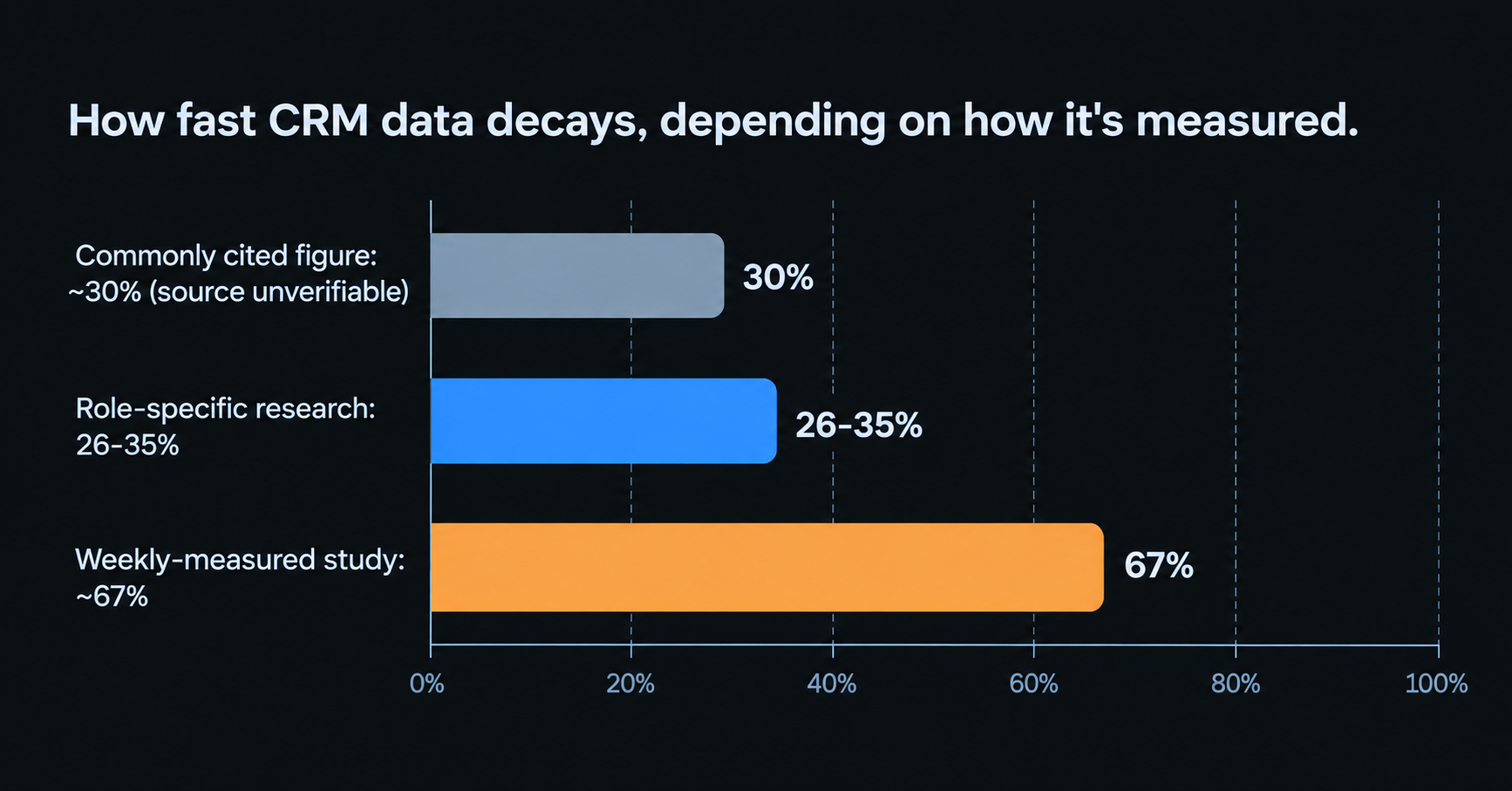
Two other more recent sources carry more weight, as their methodology is at least transparent. Cognism's 2026 study on role-specific decay in European C-suite contacts reported an average range from 26% a year for CEOs to 35% for CMOs, with US roles slightly slower. In a separate 2026 study, Cleanlist re-verified 5,000 contacts weekly for 13 weeks, rather than simply guessing the number of roles per year, and found decay closer to 67% a year, approximately twice the number the others repeat. Their logic is sound: an annual look at someone who switches jobs twice and then returns to the same role leaves out a bunch of activity along the way.
Both of those sources are produced by vendors with something to sell, which is worth keeping in mind. But their methods are stated plainly enough to evaluate, which is more than the 30% figure has ever offered. The honest answer to "how fast does CRM data decay" is that it depends heavily on role, industry, and how often you're actually checking, and anyone giving you one flat number probably hasn't checked where it came from.
What are the most common CRM data problems?
- Duplicate records. The same person, company, or deal gets entered more than once, usually through separate imports or overlapping manual entry. Duplicates split activity history and can leave the same account or lead owned by more than one rep.
- Incomplete records. Empty owner fields, missing or placeholder industry values, and no logged activity at all. A record doesn't need to be entirely wrong to be practically useless; even one or two missing fields can be enough.
- Inconsistent formatting. One rep enters "VP of Sales," another writes "VP, Sales," and a third spells it out in full. All three are correct and mean the same thing, but they sort, filter, and report differently.
- Stale or rotting data. People change jobs, companies get acquired, and phone numbers change. Without a refresh process, nobody notices the data is out of date until an email fails to deliver.
- Siloed data. Deal history and context sit in one system, related email threads live in personal inboxes, and notes end up in a spreadsheet. No person and no system holds the complete picture.
How do you know if your CRM actually needs a cleanup?
Instead of guessing, pull a random sample of 100 to 200 records and check five things: how many are duplicates, how many are missing a required field, how many have formatting inconsistent enough to break sorting, how many contact emails are unverified or already bouncing, and how many show no logged activity in the last 6 to 12 months.
If more than roughly 10 to 15% of the sample fails on any of those checks, the CRM needs attention before you trust it for forecasting or routeing. The whole exercise takes about an hour and gives you a real number instead of a gut feeling. Run it every quarter, and you'll know whether hygiene is actually improving or quietly getting worse.
What does a realistic maintenance cadence look like?
Sustainable hygiene is a rhythm, not a scramble. A four-tier cadence keeps the workload predictable instead of letting it pile up into an annual crisis.
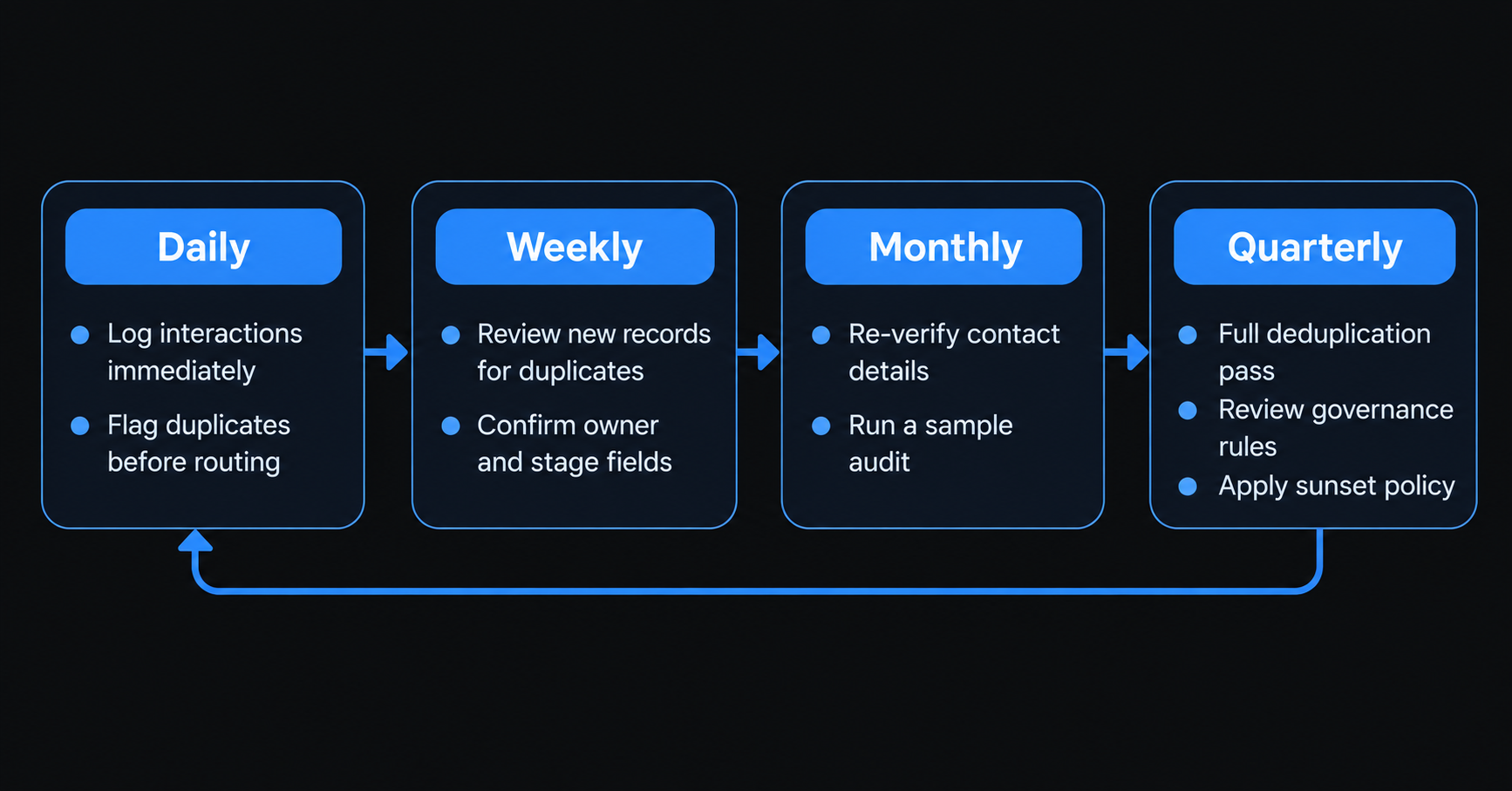
Daily
- Log interactions as they happen, not at the end of the week.
- Flag new inbound leads for a duplicate check before they get routed.
- Reject web form submissions using personal email addresses if the business relies on company domains for matching.
Weekly
- Review records created in the last seven days for duplicates.
- Confirm new deals have an owner, a stage, and a source logged.
- Fix obvious formatting errors before they get copied into other records.
Monthly
- Re-verify contact details on actively tracked accounts.
- Run the sample audit described earlier and log the failure rate.
- Reassign or archive records tied to people who've changed roles.
Quarterly
- Run a full deduplication pass across the whole database.
- Re-enrich strategic accounts rather than relying on an annual refresh.
- Review governance rules, since ICP definitions and product lines shift.
- Apply the sunset policy to anything past the inactivity threshold.
Why does dirty data get worse once AI is involved?
A rep who notices a contact's title looks outdated might pause and double-check it before sending an email. An AI-driven outbound sequence doesn't pause. It processes every record in the queue at the same speed and confidence, whether the data behind it is current or a year stale.
That changes the failure mode, not just the frequency of it. A CRM with a meaningful share of stale contacts feeding a manual workflow produces occasional bad outreach that a human might catch. The same data feeding an automated sequence produces systematic bad outreach at volume, personalized messages sent to the wrong job title, to a person who left the company, and to an email that's been dead for months. Clean data isn't a nice-to-have once AI is doing the sending. It's the thing standing between automation and a mess made faster.
Does messy CRM data create legal exposure?
This isn't legal advice, and the specifics depend on jurisdiction and how your organization actually processes data, but the exposure is real enough to name plainly.
Duplicate records can cause a genuine compliance problem, not just an operational one. If someone opts out of marketing and that request only gets applied to one of two duplicate records for the same person, they keep getting contacted despite having opted out. Retaining contact data past the period someone actually consented to is a separate issue that duplicate and stale records make it easier to miss, since nobody's tracking which version of a record is the one that matters. And if a person's data exists in multiple systems that don't talk to each other, honoring a deletion request cleanly gets harder, not easier.
None of this means hygiene work doubles as legal compliance. It means a messy CRM makes it more likely that a compliance obligation gets missed simply because no one can tell which record is the real one.
What tools actually help with this?
From process and habit, there are a few tools dedicated to certain parts of the job. None of these are endorsements, just what the category actually includes. Dedicated deduplication tools (Cloudingo, Demand Tools, Dupe Catcher, and Ring Lead) are for finding and merging duplicate records, usually with fuzzy-matching algorithms to catch near-matches.
Broader cleanup tools (Insycle, Dedupely) combine deduplication and data standardization into a single place, where you can change formatting and manage fields along with duplicates.
CRM-native tools built into Salesforce and HubSpot (free or plan add-on) detect basic duplicate records and run validation rules without an additional subscription, although these capabilities are limited by comparison. Enrichment sources (Pitch Book, Crunchbase) fill in missing info for companies and contacts, but enriched data still requires the validation you do for anything entered manually.
What metrics actually show whether hygiene is improving?
- Duplicate rate across the database.
- Percentage of records missing a required field.
- Bounce rate tied specifically to bad contact data, tracked separately from bounces caused by content or authentication.
- Time spent on manual cleanup each month.
- Percentage of records with no logged activity in the last 6 to 12 months.
These work best tracked by source, not as one blended score. A list that came from a trade show will behave differently than one built from inbound form fills, and blending them into a single number hides which one actually needs attention.
wrapping up
A CRM doesn't make its own mess. The mess comes from somewhere else, a form that never checked what people typed, an import that let the same person in twice, or just people typing things by hand instead of picking from a list. Fixing the mess is important. But if you don't fix where it came from, you'll be cleaning up the same mess again next quarter.
Start by checking your CRM first. Find out how bad it really is before you try to fix anything. Then do the simple things: use dropdown lists, check information as soon as it comes in, and pick one person to be in charge. These small habits do more good over time than one big cleanup ever will.
Frequently Asked Questions
What differs between data hygiene and cleansing?
Cleansing refers to fixing what is broken, such as duplicates, bad formats, and dead records. This process is a one-off clean. Hygiene is the continual practice that prevents a mess from developing in the first place. Cleansing is like doing the dishes once, while hygiene is like washing them daily to prevent a pileup.
How much does CRM data actually get worse each year?
People don’t agree on what the magic number is. The commonly cited figure of 30% a year isn't actually linked to anything that can be verified. The most reliable research we do have suggests somewhere between 26% and 35% per year depending on the role. According to one study, checking the data every week instead of estimating it once a year showed that the real number is closer to 67%. That’s almost double what people claim. How frequently should one clean a CRM?
How often should a CRM be cleaned?
Do a quick check once a month; just look over a couple hundred records. Then once every three months, do a bigger cleanup: remove duplicates and review the rules everyone's following. Wait longer than that, and a simple cleanup turns into a much bigger, more painful project.
Can AI automatically clean up dirty CRM data?
AI is good at spotting patterns and matching similar records quickly. But it still needs humans to set the rules and decide who's responsible for what. If you feed it old or duplicate data, it won't magically fix that data; it'll just process the same mistakes faster and at a bigger scale.
What's the fastest way to check if a CRM needs a cleanup?
Pick 100 to 200 records at random. Check them for five things: duplicates, missing information, messy formatting, bad email addresses, and no activity in the last 6 to 12 months. If more than 10 to 15% of what you checked has a problem, it's time for a real cleanup.
More from the blog

Featured Tools
Answer a few questions and get 40 to 60 logo concepts instantly — then buy just the files you need without committing to a subscription.
.png)
Turn a text script into a professional talking-head video with AI avatars in 175 plus languages — no camera studio or on-screen presenter required.
Train an AI on your face and generate hundreds of photos of yourself in any setting outfit or style — no studio no photographer no reshooting.
The AI writing platform built for marketing teams — brand voice enforcement campaign workflows and content that stays on-brand at scale.
An AI assistant built around careful reasoning and long-form reliability — particularly strong for writing analysis coding and working through complex documents.
The AI assistant that started the conversation — still the most widely used and one of the most capable general-purpose AI tools available.
Upload a recording made in a noisy room and download it sounding like it was recorded in a proper studio — completely free and no Creative Cloud subscription required.
Text or image to a PBR-textured game-ready 3D model in under a minute — with auto-rigging animations and plugins for Blender Unity and Unreal in the same pipeline.
Type a prompt and get a full song back — vocals lyrics and instrumentation in under a minute from the AI music generator with 2 million paid subscribers.

Self-host for free on your own server or pay $24 per month for cloud — the open-source automation platform where every workflow is yours to inspect debug and modify at the code level.
The voice quality benchmark for AI text-to-speech — emotionally expressive narration at $11 billion valuation with 3000 plus voices in 32 languages.
Select any region of a photo describe what should be there and watch Photoshop fill it in — professional image editing finally has an AI layer that actually earns its place.
A visual drag-and-drop automation platform where each workflow module is a lego brick — 5 to 10 times cheaper per operation than Zapier for anything with real complexity.
The revenue intelligence platform that records analyses and coaches from every sales call — showing what your best reps do differently and why deals are won or lost.

The AI image generator professionals actually use for artistic and cinematic output — consistent aesthetics polished results and the widest style range in the category.
.png)
An AI support agent that resolves customer queries autonomously and charges per successful outcome — so you only pay when it actually works.
AI-powered video interviewing and assessment platform that screens candidates at scale using structured interviews and behavioural analysis — used by global enterprises for high-volume hiring.

AI-native accounts payable automation that processes invoices codes GL accounts routes approvals and matches purchase orders — trained on over 100 million accounting documents for high no-touch rates.

Free AI tools built right into Shopify's admin for copy, images, and chat
Give it a GitHub issue a Slack message or a Jira ticket and it delivers a working pull request — a fully autonomous software engineer that runs its own environment end to end.