
B2B sales email verification is the process of checking a business email. It ensures the email is accurate, active, and deliverable before your team sends a campaign. It inspects the email format, domain, and potentially even the email address's mailbox, if the server permits. The goal is fewer bounces and a domain reputation worth protecting.
For senders at organizations that send many emails, mail providers like Gmail and Microsoft now expect email authentication. If you don’t meet these requirements, systems can reject your mail outright rather than quietly filtering it into spam.
However, verification serves its purpose. It only filters your campaign against outdated and false addresses, preventing unnecessary bounces. Verification also doesn't guarantee your email seems friendly or that your campaign avoids the spam folder.
In this post, I cover the verification checklist, nine verification tactics, the difference between verification and authentication, and what's legally allowed.
What Is B2B Sales Email Verification?
Most teams fixate on valid vs. invalid. That's not where you lose money. The real call lives in that third bucket—'unknown. ' ' Catch-alls. Role accounts. These are addresses that the tool couldn't confirm as valid or invalid. Do you send them or not? That decision costs you deals or burns your reputation. Everything else is just mechanics.
Most tools sort results into three buckets:
Valid: the domain accepts mail, and the mailbox appears to exist.
Invalid: broken format, no mail server, or the server rejected the mailbox
Risky/unknown: the address may work, but the check couldn't confirm it. Catch-alls, role accounts, and disposable addresses usually land here.
Verification produces a signal of confidence, not a yes-or-no verdict. Most of the real judgment happens in that third bucket.
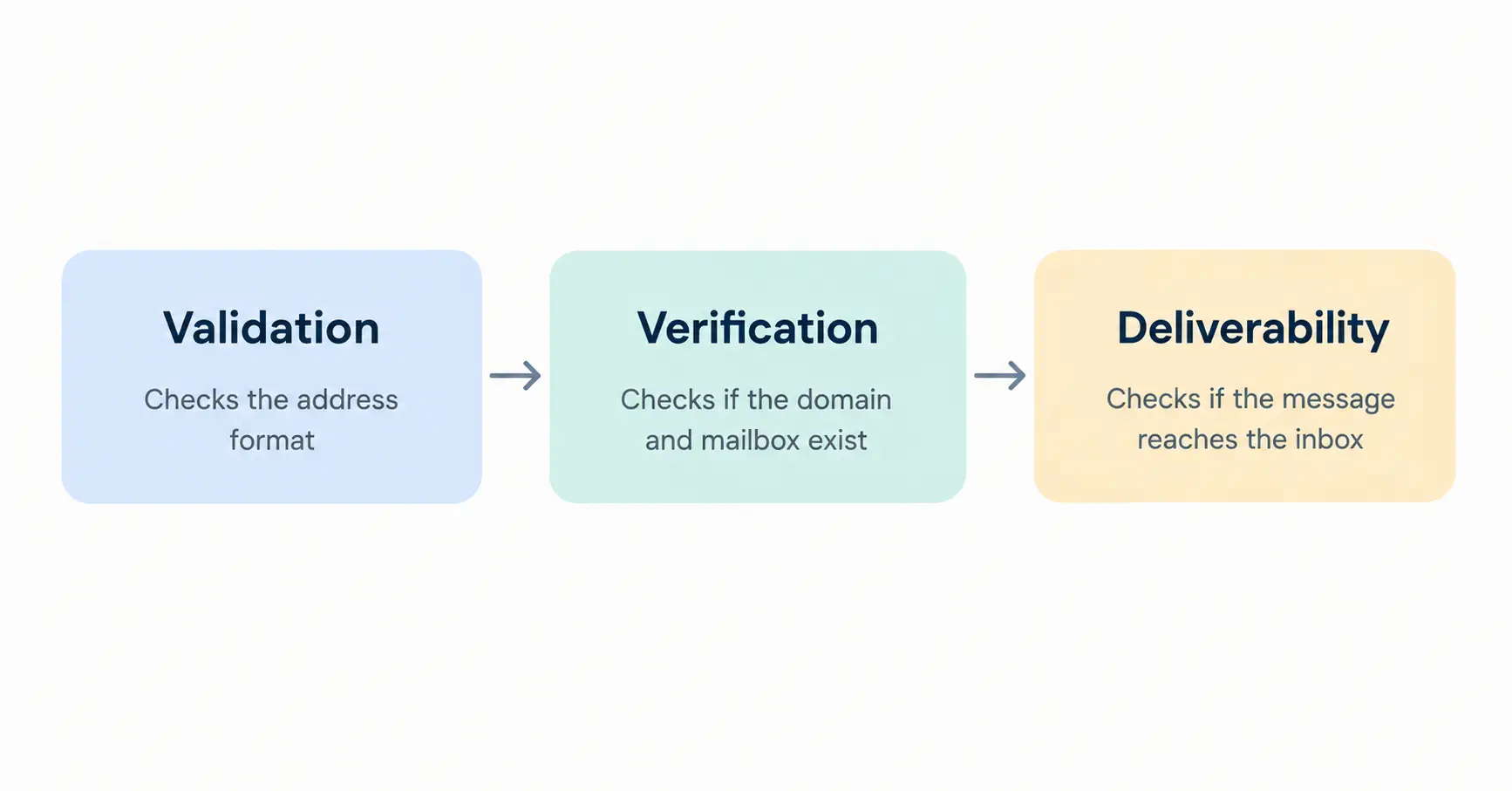
People throw around 'validation' and 'verification' as if they mean the same thing. They don't. Validation just looks at the string on the page: does jane.doe@acme even pass for a real email? Nope, 'acme' isn't a fully qualified domain name, so it fails before anything else even happens. RFC 5322 lays out the format rules, and validation catches a break like this instantly, no network call needed.
Verification checks the world behind the string: does acme.com exist, does it run a mail server, and will it accept mail for Jane Doe?
Here's the gap. jane.doe@acme-corp.com has perfectly valid syntax. Jane may have left months ago, and the domain might still be technically live but unmaintained. The string appears flawless, so the tool indicates 'valid,' but you end up hitting a wall.
Every technical check can pass, but syntax, MX, mailbox, and the list can still fail in the field, because none of those checks can see whether the company itself has changed. Verification tells you the mailbox exists. It doesn't tell you if Jane still works there or whether your message lands in her inbox instead of her spam folder. Only one of those three questions actually answers.
Why Email Verification Matters for B2B Sales
The direct benefit is fewer bounces. Each attempt to deliver to a dead mailbox produces a rejection from the receiving server, and Gmail's guidance treats a rising error rate as a signal to slow down: "If messages start bouncing or start being deferred, reduce the sending volume until the SMTP error rate decreases."
Verification offers you insight into your data source as well. A high bounce rate on a purchased list reveals that the job titles and company sizes in that file are likely as stale as the emails.
It also clarifies your metrics: a reply rate based on 1,000 emails sent is significantly less accurate when 200 of those emails bounced.
What Email Verification Does Not Improve
Two figures get conflated here, and pulling them apart tells you exactly what verification can realistically deliver.
Gmail asks senders to keep spam rates "below 0.10%" and to never approach "0.30% or higher," a threshold measured by Postmaster Tools. That number reflects one thing only: whether recipients themselves are marking your mail as spam. It is a complaint rate.
Verification does not lower it, because a verified address belonging to someone who did not want your email will still generate a complaint. Gmail's guidance on that problem is separate and direct: "Don't send messages to people who didn't sign up to get messages from you."
Bounces and complaints are different signals with different causes: verification handles the first, relevance, targeting, and consent handle the second.
So verification does not guarantee inbox placement. A verified address can still land in spam because of your content, your sending volume, your authentication setup, or a domain reputation you damaged earlier. It removes one avoidable cause of trouble, not the rest.
9 B2B Sales Email Verification Techniques
These stacks run roughly in order of cost and speed.
1. Validate Email Syntax
Syntax validation checks that an email follows the rules in RFC 5322: one @ symbol, a valid local part, and a domain with at least one dot made up of valid characters. Addresses like john.smith@@acme.com, sarah@acme (no dot in the domain), or one with a trailing space dragged from an Excel cell will all fail this check.
What it can't do is confirm anything real exists behind a properly formatted address. ceo@thiscompanyneverexisted.com passes just fine. Treat syntax validation as a cheap first-pass filter, not confirmation.
2. Verify the Domain and MX Records
The domain is everything after the @. An MX record is a DNS entry that tells mail servers where to deliver messages for that domain.
Checking for one is a cheap way to narrow an old list before spending on deeper checks.
Two limits matter here. First, no MX record doesn't automatically mean mail can't be delivered. RFC 5321 describes a fallback where a sending server can use the domain's address record instead, even with no MX published. It's uncommon, but a tool that treats "no MX" as an automatic failure can be wrong.
Second, and more relevant for sales teams: an MX record only proves a domain publishes a mail route. It says nothing about whether a specific mailbox exists behind it. A 400-person company and a domain nobody's touched in a decade can both have valid MX records.
Treat this check as narrowing the list, not delivering a verdict. DNS won't tell you why a domain lacks mail; the company may have switched domains, been folded into an acquisition, or simply never set one up.
3. SMTP Mailbox Verification: What It Can and Cannot Prove
Mailbox verification attempts to gather evidence about a specific address. A verifier opens an SMTP connection to the domain's mail server, carries the conversation as far as the recipient step, and reads the response code without actually delivering a message.
An accepted recipient is not confirmation that the mailbox exists. It only means the server was willing to continue the conversation, which is a weaker and different statement.
This can provide useful evidence, but it's also one of the least dependable checks available. How much it tells you depends entirely on how the receiving server chooses to respond, and many are configured not to respond usefully. RFC 5321 defines a dedicated VRFY command for address checks but notes that implementations "MAY provide local installations a way to disable" it, something commonly done to stop attackers from harvesting valid usernames. The same specification tells servers to reply with code 252 when they can't confirm an address.
There's also a structural reason a positive result can be wrong. RFC 5321 acknowledges that some servers don't perform recipient verification until after the full message has been received. A server like this accepts the recipient during the session, then only discovers the problem once the complete message arrives, at which point it generates a bounce. No pre-send check can catch that, because at the moment of checking, the server itself hasn't made a decision yet.
So treat the result as evidence, not proof. Three imperfect outcomes are normal:
- False negatives: a server rate-limits or temporarily rejects your probe, marking a working address as invalid.
- False positives: the server accepts the address at the recipient stage, then rejects the full message later.
- Unknown: the server declines to give a useful answer at all.
A large "unknown" group reflects how mail servers are configured today, not necessarily a sign the tool is broken. Judge a verification provider by how honestly it reports that group, not by how small it manages to make it look.
4. Detect Disposable and Temporary Addresses
Disposable addresses are reserved for services that furnish mailboxes that will be good for a minute or a day. They're used to bypass signup forms that ask for an address they don't intend to use.
They're added to B2B lists via free trials, gated content, and webinar signups. Someone grabs your price sheet with a disposable address, the record gets added to your CRM as a complete lead, and a rep spends an hour on the phone with someone who was never going to buy from you. Detection is usually accomplished by cross-referencing the domain with a list of temporary-mail vendors, sometimes weighted by the age of the domains.
That's never 100%; new disposable domains pop up every day, and any database is only as current as the last update, so anticipate some misses and think of "no match" results as the absence of matching data, not proof the address is legitimate.
If most of your pipeline is self-service, check the signup before the campaign.
5. Identify Role-Based Addresses
The role-based addresses don't have an owner, as in "person," but are attached to a function: admin@, sales@, info@, support@, or billing@. Verification tools flag them by matching the local part against common function names.
The point of flagging them is not deliverability. These addresses are often real and may accept mail. The issue is fit. A shared or functional inbox may be monitored by several people, routed into a ticketing system, or checked infrequently, which makes it a poor destination for a message written to one named person. Personalization aimed at an individual reads oddly when it arrives in a queue.
They're also outside your control in a way individual addresses aren't. You can't see how a shared mailbox will handle your unsolicited email from the outside. That makes these addresses harder to assess than individual mailboxes, because a successful verification result doesn't tell you how the recipient will treat your message. For that reason, catch-all results deserve their own category rather than being treated like normal, verified addresses in your sequences.
But it doesn't mean you have to ignore them. Segment these out of your one-to-one prospecting, and use them in areas where you actually need a shared inbox to be an effective way of working: partner invites, vendor inquiries, and support follow-ups. If all you've got is info@ for a target account, it's generally worth the effort of finding a name.
6. Detect Catch-All and Risky Domains
This is a domain designed to receive all incoming email for the specified domain: a virtual mailbox for everyone. Throw it in the general direction of qwerty123@acme.com and have the server take the receipt.
This is what makes catch-all results awkward. Mailbox verification works by reading how the server responds to a specific recipient, but a catch-all server responds the same way to every recipient. An accepted response tells you the domain will take the message. It's never going to tell you if your email address is someone's personal inbox or whether your email is ever going to get read. Other checkers will list these as 'catch-all,' 'accept-all,' or 'unknown' rather than valid, which is the honest answer.
While writing this article, one thing popped up several times across these cold-email groups: once bounces dropped into the 2–3% range, switching verification tools stopped making a difference. Professionals managing these lists traced the remaining gap to the same bucket: catch-all addresses, which every tool identifies as unsafe rather than resolved. Several people reported better results treating that group as recoverable: checking the contact through some other method rather than discarding the address, since an "unknown" inbox flagged by any tool is often untouched territory anyway.
Related risk signals worth flagging alongside catch-all results include recently registered domains, domains with no working website, and local parts that look machine-generated.
An accepted address is not a verified address. Since the catch-all domain will accept mail in the address, the misspelled address can remain undiscovered for a long period of time.
For a sales team, three responses are reasonable:
- Catch-all results go to a different bucket with lower traffic volume. Don't mix them in your main sequences.
- Instead, make sure of the person with a different approach, maybe from their LinkedIn profile, another company page, or through a response.
- Hold them back entirely while warming up a new sending domain when you have the least reputation to spare.
7. Verify Emails Before Adding Leads to Your CRM
Verification is most useful at the point of entry, not after a campaign has run.
Lead captured → verified → written to CRM with a status field → segmented → contacted
In that order, an address that fails verification is caught before it reaches a sequence. Reversed, it gets sent to, bounces, and only then gets cleaned after the damage is recorded.
In practice this means a real-time application programming interface (API) call on your web forms, plus an automated check on every list import. Store the status and the date it was checked on the contact record, so anyone building a segment later can filter on both.
8. Re-Verify Older B2B Email Lists
B2B email data decays faster than most contact data, because it is tied to employment. Common causes:
- Someone changes employer, and the mailbox is closed.
- A company is acquired and moves to the parent company's domain.
- A domain lapses and stops resolving.
- The address format changes after a migration: first. last@ becomes flast@.
- A mailbox is converted to a catch-all or forwarded elsewhere.
A list you verified in March is not the same list in September. This is recurring work, and it applies to your CRM as much as to any list you buy.
9. Use Automated Verification at Scale
Manual checking works for a handful of addresses. As a list grows, running the DNS lookups and SMTP conversations by hand stops being practical:
- Batch verification—upload a file, get a scored file back. Best for cleaning an existing database or a new purchase.
- Real-time API verification—one address checked at the moment of capture. Best for web forms.
- CRM or sequencer integration—verification runs as records are created or before a sequence sends.
When comparing tools, ask four questions: how are unknown and catch-all results reported, are you billed for them, what is the provider's stated accuracy measured against, and where is your prospect data processed and stored? That last one matters if your list contains personal data of people in regulated jurisdictions.
Manual vs. Automated Email Verification
| Method | Best for | Scalability | Accuracy | Effort |
|---|---|---|---|---|
| Manual | Under ~50 high-value accounts | Low | Adds context a tool cannot—evidence about the role, not just the address | High; minutes per address |
| Automated | Larger lists | High | Consistent on deliverability signals; reports unknown for catch-all and unresponsive servers | Low after setup |
The two answer different questions. Manual checks, a DNS lookup, the company's team page, and a public profile help you judge whether this is still the right person, which an automated tool cannot assess at all. Automated verification estimates whether the address will accept mail across thousands of records in minutes. Neither is conclusive on its own: a team page can be out of date, and a positive verification result is a signal rather than a promise. Most teams run automation across the whole list and reserve manual research for named target accounts.
How to Verify a B2B Email List Step by Step
Step 1: Export your prospect list. Include email, name, company, domain, and source. A trade-show list and a vendor list tend to fail at different rates, and you want to be able to tell them apart later.
Step 2: Remove obvious duplicates. Deduplicate on the address, lowercased and trimmed. Watch for the same person appearing under two domains after an acquisition.
Step 3: Run verification. Syntax, then domain and MX, then mailbox, then disposable, role-based, and catch-all detection.
Step 4: Split results three ways. Valid goes into sequences. Invalid gets suppressed; mark it rather than deleting it, so you do not re-import the same bad address next quarter. Risky and unknown go to a holding segment for a decision.
Step 5: Update your CRM with the status and the verification date. Without the date, the status is close to meaningless in six months.
Step 6: Set a re-verification trigger based on the signals below rather than an arbitrary calendar rule.
Step 7: Watch bounces by source. Keeping track of bounces per list source, and not just overall, is what changes from "deliverability is going down" to "we have a problem; here is what is causing it."
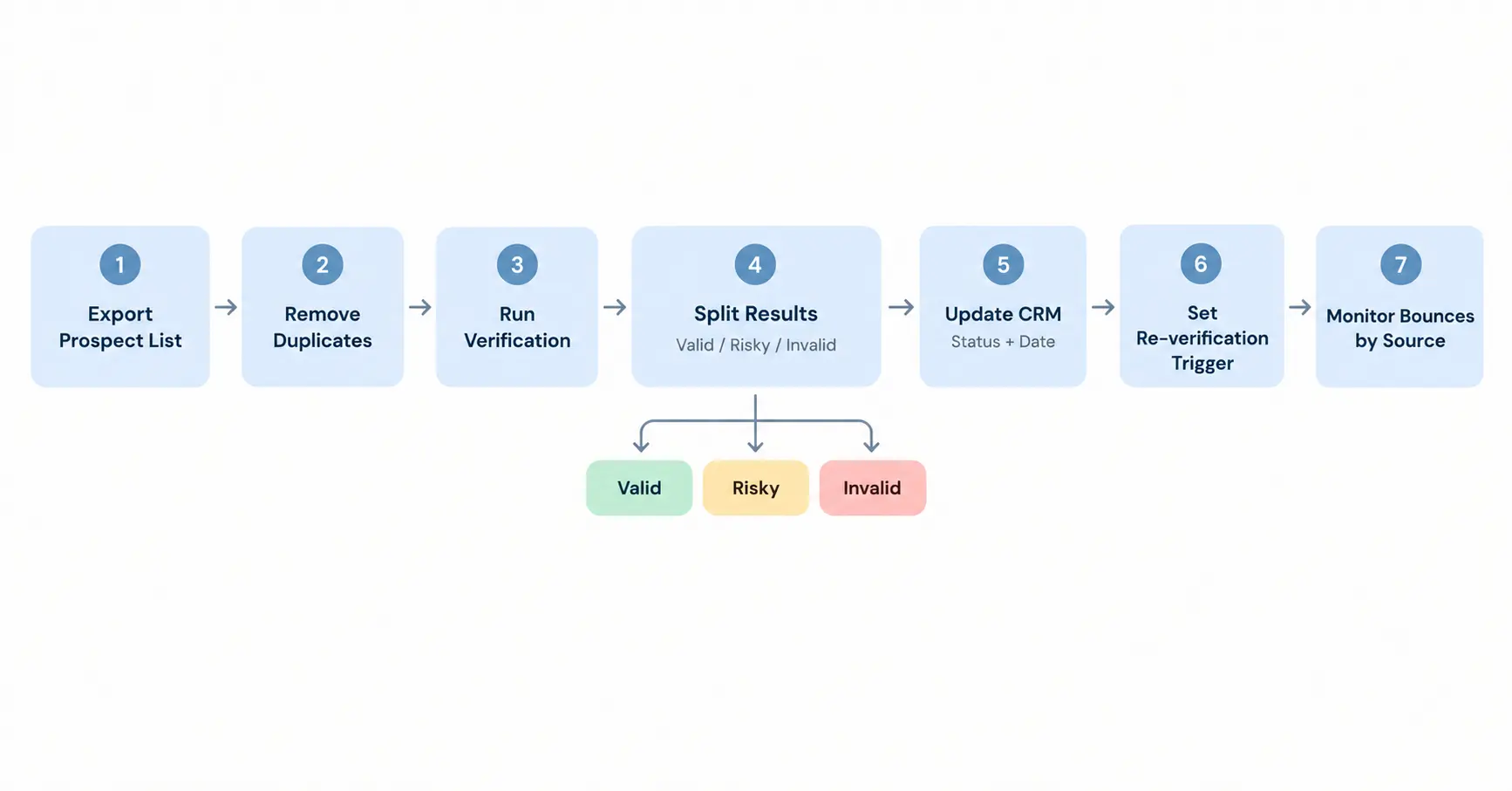
The exact sequence depends on your systems and your provider; some tools bundle several of these checks into a single call, and some CRMs can trigger verification on record creation without custom work.
Email Authentication vs. Email Verification
Email verification and email authentication are not the same thing. Verification checks the recipient. Authentication is how you give receiving servers verifiable evidence that a message really comes from your domain. Both affect whether your mail is accepted.
| Term | What it does | Which side does it concern? |
|---|---|---|
| SPF (Sender Policy Framework) | DNS record listing which servers may send mail for your domain | Sender |
| DKIM (DomainKeys Identified Mail) | Signature lets a receiving server verify the message's domain-level authenticity. | Sender |
| DMARC (Domain-based Message Authentication, Reporting, and Conformance) | Defines handling and reporting for messages that fail SPF/DKIM authentication or alignment. | Sender |
| MX record | Tells other servers where to deliver mail to a domain. | Recipient |
| Reverse DNS (PTR record) | Maps a sending IP address back to a hostname. | Sender |
| HELO/EHLO | The greeting a sending server uses to identify itself when an SMTP session opens. | Sender |
None of these guarantees delivery on its own. They reduce the reasons a receiving server has to distrust you.
Google expects those sending to personal Gmail accounts to adhere to minimal criteria (like SPF, DKIM, legitimate forwarding/reverse DNS records and TLS, and the correct RFC 5322 format), regardless of message volume, according to its Sender Guidance documentation. Those going above the 5,000-emails-per-day threshold and hitting the top tiers of its senders need an additional layer: DMARC.
Microsoft applies a comparable threshold to its consumer services. Its support documentation states that senders of "5,000 or more email messages to Microsoft consumer email services" must publish SPF, DKIM, and DMARC records; that "both SPF and DKIM checks must pass"; and that at least one must align with the domain in the RFC 5322 From: address. Mail that fails is rejected with a 550 5.7.515 error rather than being delivered to junk. These requirements concern Microsoft's consumer mailboxes, Outlook.com, Hotmail, and Live addresses, not every Microsoft-hosted domain.
One practical note, since this trips up sales teams: if you send through a sequencing platform or an email service provider, that provider usually controls the sending IP and its PTR record. What remains yours is the DNS for your own domain, the SPF, DKIM, and DMARC records. Check which side of that line each requirement falls on before assuming it is handled.
The relationship to verification is that they fail in different ways. Strong authentication with a stale list still produces bounces. A clean list sent from an unauthenticated domain can be rejected before its quality matters.
When to Re-Verify B2B Email Lists
There is no one magical answer when it comes to a consistent duration, and those numbers are usually rough guidelines, not proven stats. Instead of relying on time:
- Bounce rate rising, especially within one segment or one source.
- The list has not been verified since collection, or you cannot tell when it last was.
- High-turnover roles—sales and marketing contacts tend to move more often than finance or engineering.
- The data was purchased, scraped, or supplied by a third party. Verify before the first send regardless of what the vendor claims.
- You are about to run a large campaign or warm up a new sending domain.
- A known organizational change at a target account—an acquisition, a rebrand, or a domain migration.
- No engagement across several campaigns.
How to Keep B2B Email Data Clean
Treat verification as a loop rather than a project:
Lead captured → verified at entry → CRM with status and date → segmented by risk → outreach → bounces and replies monitored → re-verified on signal → CRM cleaned
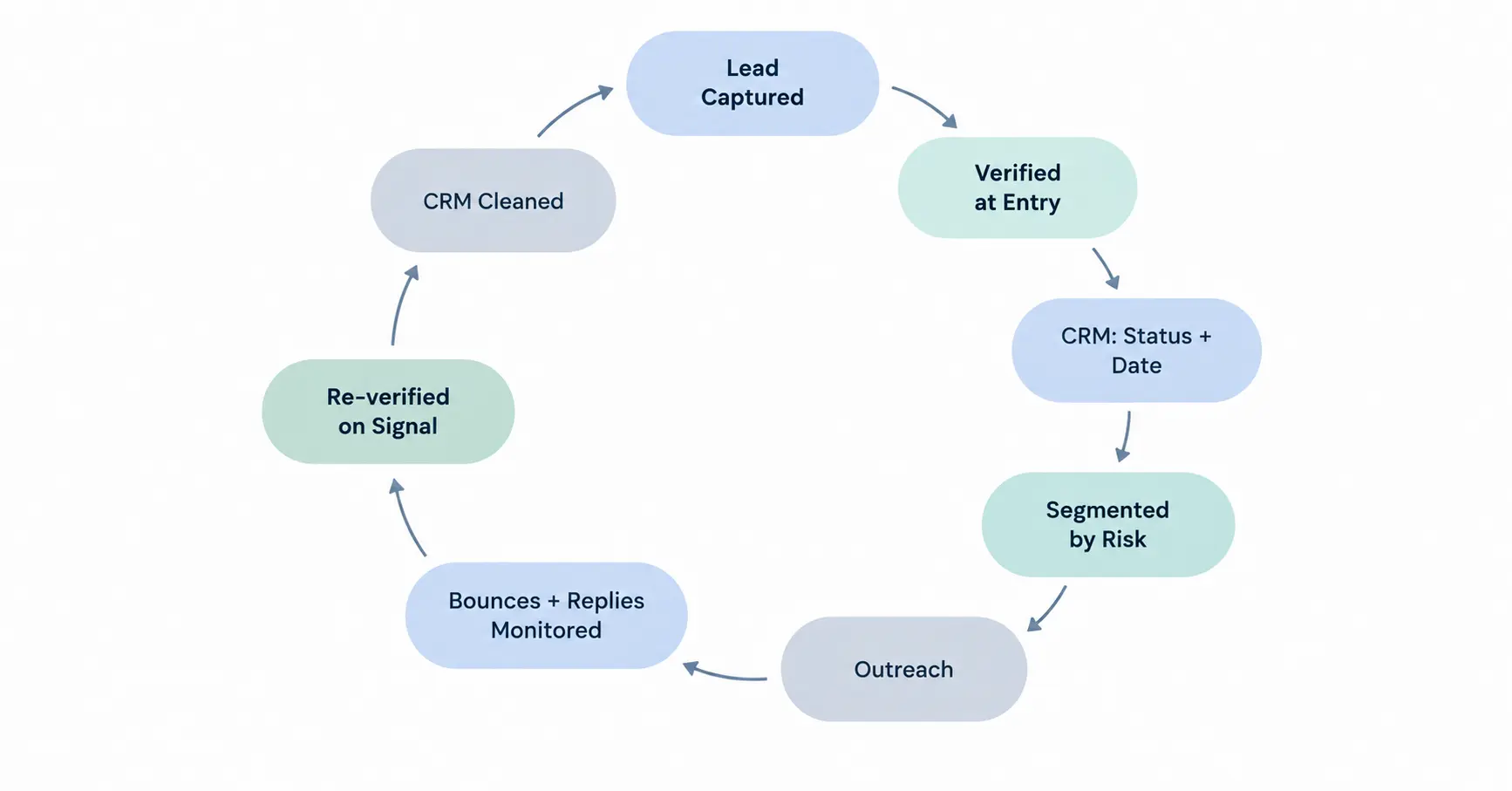
Each stage enables the next. Verifying an entry keeps bad records out. Storing status and date makes segmentation possible. Segmenting by risk keeps catch-all and role-based addresses out of high-volume sequences. Monitoring bounces tells you when a segment has decayed, which is what should trigger re-verification.
Two habits hold the loop together: process bounces automatically, so a hard bounce suppresses the record without anyone remembering to do it, and record the source of every contact, so a bounce spike can be traced back to where the data came from.
Common B2B Email Verification Mistakes
Sending first, cleaning later. By the time you act on the bounce data, it is already recorded against your domain. Verify before the first send.
Treating every "valid" result as equally safe. Catch-all and role-based addresses can come back deliverable while being poor targets. Segment by result type rather than a single pass/fail field.
Never re-cleaning old lists. A CRM built up over several years can hold contacts who have since changed employer. Re-verify before large campaigns and before any domain warm-up.
Deleting everything marked risky. Some of those are real prospects behind strict mail gateways. Hold them in a lower-volume segment instead of discarding them.
Relying on syntax checks alone. A regular expression cannot see DNS and will not catch a dead domain.
Buying large unverified lists. Low-cost lists are often low-cost because nobody has maintained them. Verify before the data touches your CRM, and track its bounce rate separately from data you collected yourself.
Assuming verification handles compliance. It does not.
Legal and Compliance Considerations
Email verification is a data-quality process. It can tell you whether an address is technically valid, not whether you're allowed to send that person marketing emails. The answer to that depends on who the recipient is, where they're located, what kind of subscriber they are, and how you got their address.
This is a primer, not a legal treatise. Each jurisdiction differs in what it mandates, and your organization should evaluate where it stands with its counsel.
United States
Although the law applies to commercial e-mail without requiring opt-in, it does have the following standards for the "message" that the law regulates: accurate subject headings and headers, identifying it as an ad, and having your valid physical address and an operational opt-out.
Penalty from the Federal Trade Commission (FTC) for not accommodating opt-out requests within 10 days. "More than one person may be held responsible for violations," so another company sending on your behalf won't shield you. CAN-SPAM is counted as a fine per e-mail, adjusted annually for inflation. from the FTC's current guidance. CAN-SPAM is not the only U.S. rule in place, in addition to state and industry-specific rules.
European Union
Under GDPR, emailing a named individual, even at a company, counts as processing personal data, which needs a lawful basis. Recital 47 allows that direct marketing "may be regarded as carried out for a legitimate interest," but that's grounds for an assessment, not a blanket yes; it still depends on your circumstances. Each EU member state's ePrivacy rules add their own requirements on top, and these differ by country. Recipients also retain the right to object to direct marketing.
United Kingdom
The UK's ICO draws a line by subscriber type under PECR: its guidance states the PECR rule on electronic marketing "does not apply to corporate subscribers," though sole traders and some partnerships count as individual subscribers, where consent or the soft opt-in applies. Either way, you must identify yourself clearly and give a way to opt out. UK GDPR still applies wherever personal data is involved, including a named person at a corporate subscriber.
The practical point: verification and permission are two separate gates. An address can pass every technical check and still be one you have no lawful basis to email.
B2B Email Verification Methods Compared
| Technique | What it shows | Automation | Best use |
|---|---|---|---|
| Syntax check | The address is correctly formatted. | Instant, no network needed | First filter on every import and form |
| Domain / MX check | The domain publishes a mail route. | Fast, DNS only | Clearing domains that are not configured for mail |
| Mailbox verification | How the server responds to the recipient | Slower; varies by server | Gathering additional evidence before a send |
| Disposable detection | The domain matches a known temporary-mail provider. | Instant lookup | Self-serve signups, gated content, free trials |
| Role-based detection | The address is a shared function, not a person. | Instant pattern match | Keeping shared inboxes out of 1:1 sequences |
| Catch-all detection | The server accepts arbitrary recipients, making the result inconclusive. | Part of the mailbox check | Deciding how to treat uncertain results |
| Re-verification | Whether the record still holds up now. | Scheduled batch job | Old CRM data, purchased lists, pre-campaign checks |
Conclusion
Verification is a stack of inexpensive checks that get progressively more granular: syntax, then domain and MX, then the mailbox, then the risk flags that catch an address that was accepted but isn't actually confirmed.
Three things worth carrying away. Verify at the point of capture, not after a campaign has already bounced. Sort results into valid, risky, or invalid, rather than treating verification as a simple on/off switch. And keep two things separate from verification itself: sender authentication (SPF, DKIM, and DMARC) and the consent rules that govern whether you're allowed to send to a given address at all.
Where to start: export your CRM contacts, flag every entry by when it was last verified, and run a fresh check on anything that hasn't been touched since your last campaign. Whatever comes back bad isn't a guess anymore. It's the actual size of your problem.
Frequently Asked Questions.
How do you verify a B2B sales email?
Run it through syntax validation, a domain and MX lookup, and a mailbox check, then flag disposable, role-based, and catch-all results. For high-value contacts, also confirm the person is still in the role.
What is the best way to verify a B2B email list?
For larger lists, batch verification through a tool is generally more practical than checking addresses individually. Then segment the results into valid, risky, and invalid rather than applying a single pass/fail filter.
How often should B2B emails be verified?
There is no evidence-based, universally best cadence. Re-verify after your bounce rate increases, before sending a big campaign or warming up a domain, or whenever you're dealing with a list that hasn't been verified since collection.
Does email verification improve deliverability?
It can help by reducing avoidable bounces, but that's the only signal it addresses. It doesn't affect your spam complaint rate, which is driven by whether recipients want your mail. Authentication, content, sending volume, and targeting all matter separately, and no tool can promise inbox placement.
What is the difference between email validation and verification?
Validation checks whether the address is formatted correctly. Verification checks whether the domain and mailbox appear to exist and are likely to accept mail.
Can email verification prevent bounced emails?
It can reduce avoidable bounces, but it can't eliminate them. A mailbox can be closed the day after you verify it, and a catch-all configuration can hide a non-existent mailbox from any pre-send check.
Should I verify emails before cold outreach?
Yes, particularly on purchased or older data. It does not replace the separate question of whether you may lawfully email that person.
More from the blog
Featured Tools
Answer a few questions and get 40 to 60 logo concepts instantly — then buy just the files you need without committing to a subscription.
.png)
Turn a text script into a professional talking-head video with AI avatars in 175 plus languages — no camera studio or on-screen presenter required.
Train an AI on your face and generate hundreds of photos of yourself in any setting outfit or style — no studio no photographer no reshooting.
The AI writing platform built for marketing teams — brand voice enforcement campaign workflows and content that stays on-brand at scale.
An AI assistant built around careful reasoning and long-form reliability — particularly strong for writing analysis coding and working through complex documents.
The AI assistant that started the conversation — still the most widely used and one of the most capable general-purpose AI tools available.
Upload a recording made in a noisy room and download it sounding like it was recorded in a proper studio — completely free and no Creative Cloud subscription required.
Text or image to a PBR-textured game-ready 3D model in under a minute — with auto-rigging animations and plugins for Blender Unity and Unreal in the same pipeline.
Type a prompt and get a full song back — vocals lyrics and instrumentation in under a minute from the AI music generator with 2 million paid subscribers.

Self-host for free on your own server or pay $24 per month for cloud — the open-source automation platform where every workflow is yours to inspect debug and modify at the code level.
The voice quality benchmark for AI text-to-speech — emotionally expressive narration at $11 billion valuation with 3000 plus voices in 32 languages.
Select any region of a photo describe what should be there and watch Photoshop fill it in — professional image editing finally has an AI layer that actually earns its place.
A visual drag-and-drop automation platform where each workflow module is a lego brick — 5 to 10 times cheaper per operation than Zapier for anything with real complexity.
The revenue intelligence platform that records analyses and coaches from every sales call — showing what your best reps do differently and why deals are won or lost.

The AI image generator professionals actually use for artistic and cinematic output — consistent aesthetics polished results and the widest style range in the category.
.png)
An AI support agent that resolves customer queries autonomously and charges per successful outcome — so you only pay when it actually works.
AI-powered video interviewing and assessment platform that screens candidates at scale using structured interviews and behavioural analysis — used by global enterprises for high-volume hiring.

AI-native accounts payable automation that processes invoices codes GL accounts routes approvals and matches purchase orders — trained on over 100 million accounting documents for high no-touch rates.

Free AI tools built right into Shopify's admin for copy, images, and chat
Give it a GitHub issue a Slack message or a Jira ticket and it delivers a working pull request — a fully autonomous software engineer that runs its own environment end to end.