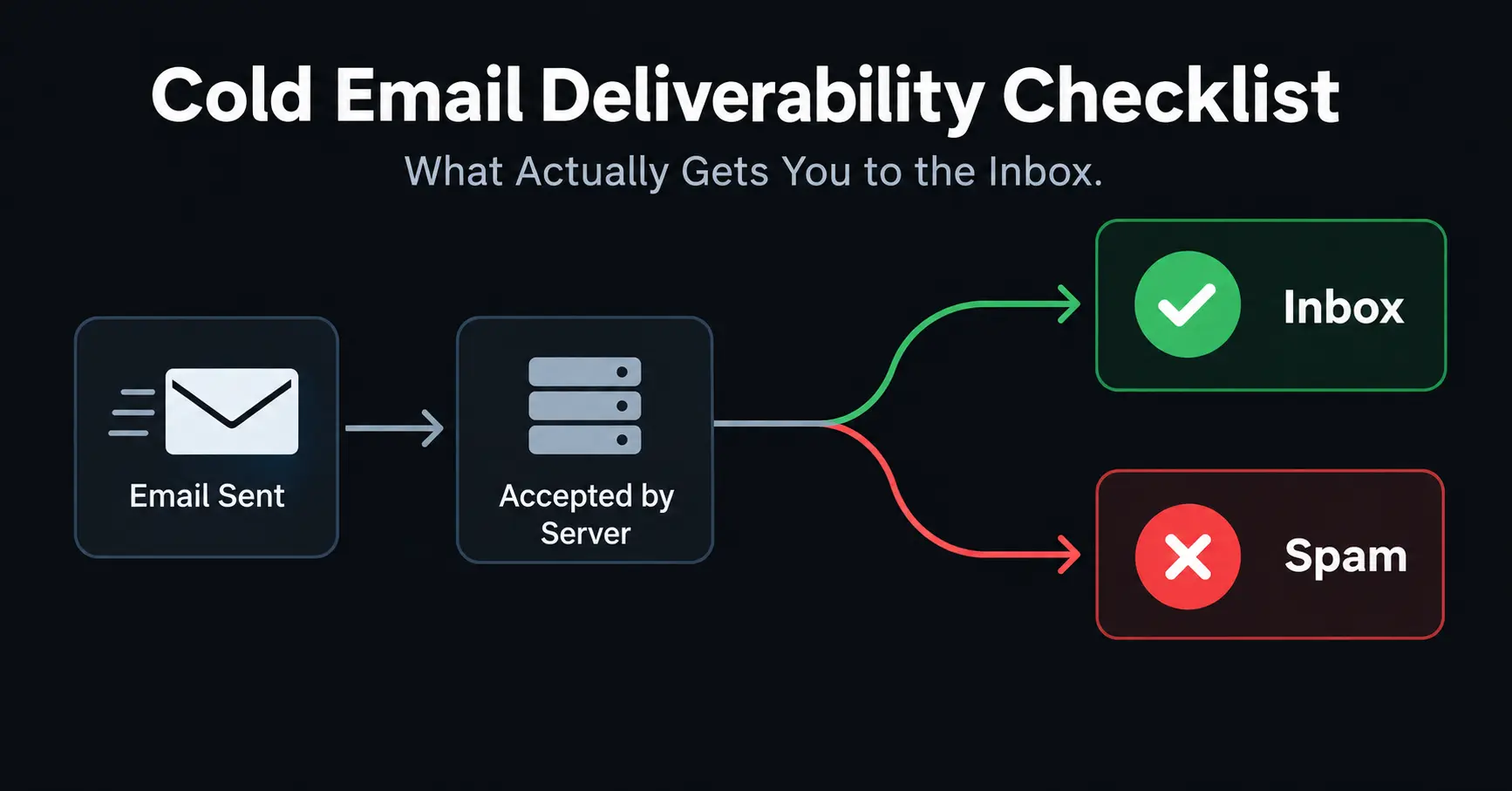
Cold email starts at a disadvantage. The person you're emailing has never heard from you before. They never agreed to get your message. Their inbox provider has no history with you either. So every signal Gmail or Microsoft uses to decide if you're trustworthy has to come from how your systems are set up and how you send, nothing else. That's the whole reason a perfectly "successful" send can still end up going nowhere.
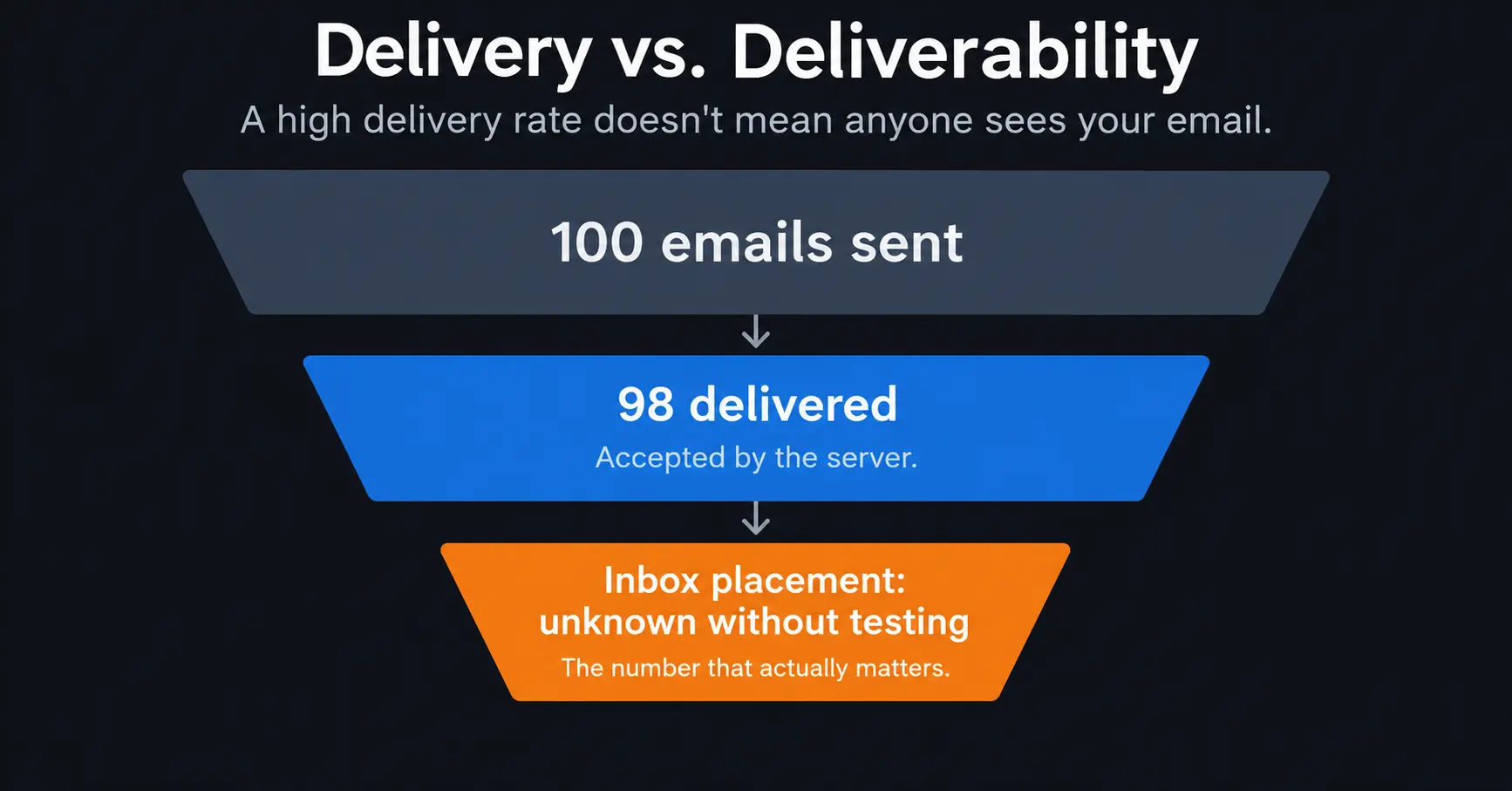
Here's what trips people up. A campaign can show 98% delivery and still be a failure. Delivery just means a server agreed to accept your message. It says nothing about where that message actually landed. Plenty of "delivered" emails are sitting quietly in spam folders nobody ever opens.
The difference between delivery and deliverability is where nearly all of the advice on this subject diverges. This guide covers what matters, why it matters, and what to do when everything hits the fan.
Delivery vs. Deliverability
People use these two words like they mean the same thing. They don't, and mixing them up is part of why so many teams think their email is working when it isn't.
| Term | What it actually tells you |
|---|---|
| Delivery | A server said yes, I'll take this message. That number is almost always in the high nineties, no matter how good or bad the email actually is. |
| Deliverability | The share of emails that land somewhere a real person will see. Your sending tool usually can't tell you this number directly. |
A message can be delivered and still never be seen. That's exactly why inbox placement testing exists as its own separate check.
Before You Hit Send
Look, before you send a single cold email, you need to fix your technical setup. If you skip this part? Absolutely nothing else you do will matter.
- First, lock down your authentication. Set up SPF, DKIM, and DMARC on your sending domain—and actually test that they work. A record that sits there but doesn't validate is entirely useless.
- Next, buy a separate domain strictly for outbound outreach. Never use your main company domain. If your cold email domain gets blacklisted or trashed by spam filters, you don't want it tanking the inbox your invoices and customer support rely on.
- When you get that new domain, warm it up slowly. Never blast high volume from an inbox younger than 30 days. Start small: five emails a day, then ten, then twenty, building up to fifty. Even when everything is running smoothly, most experienced senders cap it between 50 and 100 emails per address per day.
- Finally, clean your data early. Run your list through a verification tool before it ever touches a campaign, not after your bounce rate spikes. Check that your domain and IP aren't already on a blocklist on day one. And if you are sending to Gmail users, get Google Postmaster Tools running immediately. It is the only way to see your actual spam complaint rate.
Keeping an Eye on Things While Campaigns Run
Hitting "send" is just the beginning. The real work is keeping those emails out of the spam folder.
- Start by breaking down your data. Don't look at global bounce rates—track Gmail, Outlook, and Yahoo separately. They all grade you on a different scale. Next, stop blasting your entire list. If a contact hasn't opened an email in months, cut them loose. Sending to dead weight drags down your entire account.
- Watch your metrics closely. The moment you see a widening gap between "delivered" and "opened," pay attention. That is your early warning sign that something is broken, long before an official alert pops up.
- Do a quick reputation audit. Go to Talos, paste your domain or IP, and look at the rating. Clean, neutral, or damaged? It takes two seconds, but most people completely ignore it.
- Lastly, strip out the fluff. No heavy images. No complex HTML. Cut back on tracking pixels and redirect links entirely if you can. Spam filters hate hidden tracking elements. If they aren't critical to your business, drop them.
What to Do When Something Suddenly Breaks
When your deliverability tanks overnight, don't panic and start guessing. Follow a strict diagnostic process.
Start with the blocklists. Check your domain and send the IP immediately. This is the fastest win to rule out, and it is usually the culprit behind a sudden drop.
Think about your recent actions. What changed? A new tool, a fresh domain, a massive volume spike, or a new template? Sudden delivery issues are almost always triggered by one specific update, not a slow, mysterious decline.
Look at the raw data. Read the actual bounce error code. Code 550 5.7.515 tells you the exact rule you violated, which gives you a real roadmap instead of just a generic "bounced" flag.
Audit your list next—especially if you're dealing with bought or scraped data. Then, re-verify your authentication. A single DNS update can instantly shatter your setup behind your back.
Crucial step: throttle your volume right now. Trying to power through a deliverability crisis only digs a deeper hole.
Recovery timelines vary completely by the cause. Fix a broken DNS record today, and it might take a few days to reflect in your inbox placement. Repairing a reputation damaged by high spam complaints takes weeks of low-volume, flawless sending. Delisting from a blocklist is a wildcard—some disappear automatically in 48 hours, others require a manual appeal.
Why SPF, DKIM, and DMARC Aren't Optional Anymore
These three used to be something you could get away with skipping. That's no longer true if you're sending any real volume.
Google now expects at least SPF or DKIM from anyone sending to a personal Gmail account, no matter how much you're sending. Once you cross around 5,000 messages a day, both SPF and DKIM become required together, along with a DMARC record on top. Google also sets a clear limit on spam complaints: stay under 0.10%, and never get close to 0.30%, a number you can only see through Postmaster Tools, not your own sending dashboard.
Microsoft holds senders to a similar bar for its consumer mail services. Send 5,000 or more messages a day to Outlook.com, Hotmail, or Live addresses, and you need SPF, DKIM, and DMARC all working together properly, with at least one aligned to the domain in the From: address. Miss the mark, and your email gets rejected outright with an error like 550 5.7.515, not quietly filtered to spam, just refused entirely.
Here's something a lot of teams miss. Since late 2025, Gmail has gotten noticeably stricter about enforcing all of this. It used to be that broken authentication meant your email landed in spam. Now, it's increasingly rejected before it even reaches the inbox at all. So a mistake here doesn't just hurt your placement anymore; it can stop delivery completely.
If you're sending in bulk to Gmail or Yahoo, you also need to support one-click unsubscribe, a technical standard called RFC 8058. You still need a visible unsubscribe link in the email itself, but for bulk mail, that link alone isn't enough anymore to satisfy the actual requirement.
None of this guarantees your email lands in the inbox. What it does is remove the obvious reasons a mail server would distrust you outright, which has to happen before anything else on this list can even matter.
BIMI: Nice to Have, Not Something to Chase Early
BIMI puts your verified company logo right next to your email in inboxes that support it. But it only works once your DMARC setup is already strict, sitting at quarantine or reject, not just monitoring. So BIMI is really a reward for already having your authentication locked down, not something that helps you get there.
If your domain's already struggling, a logo next to your name won't fix that. Treat it as a nice trust signal for later, once everything else is already working.
What Warming Up Actually Does, and What It Doesn't
Warming up a new domain means starting small and slowly increasing your volume, often with real back-and-forth replies, so it looks like a normal person using their email instead of a script blasting messages out. If your domain is genuinely new, skipping this step is a real mistake. Providers tend to treat anything under 30 to 60 days old as riskier by default, and a big first send can get throttled no matter how good your list actually is.
Here's where a lot of advice oversells it, though. Warm-up traffic is really just mailboxes you control talking to each other. It's not the same as a real person actually reading and engaging with your email, and mail providers seem to have gotten better at telling the difference over time. A domain can look perfectly healthy after weeks of warming up, then suddenly struggle the moment a real campaign runs at full scale, simply because nothing about real engagement was ever actually tested.
Warm-up buys you a starting reputation. It's not a replacement for the ongoing work of sending mail people genuinely want to receive.
Your Contact List Matters More Than People Think
A lot of people confuse two different questions here, so it's worth spelling out clearly. Verification asks: is this a real address that can actually receive mail? Deliverability asks something different: once it's received, does it actually land in the inbox? A verified address helps your deliverability. It doesn't guarantee it.
A perfectly clean, verified list sent from a domain with no real authentication can still get rejected. And a list that's a bit messy, sent from a domain with a strong reputation, will still rack up complaints and bounces over time. Both things need to be true at once.
- Remove hard bounces right away. Don't just re-import the same bad address next quarter without figuring out why it failed the first time.
- Watch out for shared addresses like info@ or sales@. They rarely reply, and when they do respond, it's disproportionately to complain.
- Re-check anything that hasn't been verified recently. Business contact data goes stale faster than most people expect; someone who left their job six months ago is still sitting in your list unless you catch it.
- Keep hard bounces under roughly 2%. Cross that line, and providers start treating your whole sending pattern as careless, regardless of how good any individual message actually is.
Writing Emails That Actually Get Through
Spam filters have gotten smarter than simply scanning for a few bad words. They now look at structure, how many links you're using, how much of the email is images versus actual text, and whether your message resembles other bulk mail that's already been flagged somewhere else.
- Keep your message short and specific to the person you're writing to. A generic template sent to a thousand people reads as bulk mail, even if you technically dropped their first name into it.
- Watch your link count, and make sure any tracking domain or shortened link you're using isn't already blocklisted somewhere.
- Lean toward plain text over image-heavy design. Plain text genuinely performs better in cold outreach.
- Always include a real, working way to opt out, regardless of whether the technical rules for your sending volume require it.
- Upload new contacts in smaller batches rather than one huge import. Test 20 to 50 contacts first, see how they perform, then scale up. A slow rollout gives you a real chance to catch a bad list before it damages your whole domain.
Frequently Asked Questions
What's the actual difference between delivery and deliverability?
Delivery just means a server agreed to accept your email. Deliverability means it actually reached somewhere a person will see it. You can have a delivered email sitting quietly in spam, which is why looking at delivery rate alone doesn't tell you much.
What counts as a reasonable target for complaints and bounces?
Google says to stay under 0.10% for spam complaints and treats 0.30% as a hard line you shouldn't come close to, a number you'd only see in Postmaster Tools. For list quality, most people try to keep hard bounces under about 2%.
How often should I recheck my email list?
There's no single perfect number here; it really depends on your industry and how often people change roles. As a general habit, re-check before any big campaign, before warming up a new domain, and definitely for any list you never verified when you first collected it.
Do I really need a separate domain just for cold outreach?
Yes, and it's standard practice for good reason. If your outreach domain takes a reputation hit, you don't want that affecting the email, your actual business, contracts, invoices, or support, depending on. That second domain still needs its own complete authentication setup; it doesn't automatically inherit anything from your main one.
Is warming up enough by itself to keep my deliverability healthy?
No, and this trips a lot of people up. Warm-up helps establish an early sending pattern, which genuinely matters on a brand-new domain. But it's just one factor among several, and it tends to fade in importance the fastest once real campaigns actually start running.
If deliverability suddenly drops, how long does it usually take to recover?
It really depends on what caused it. A broken authentication record might get fixed in a day, though it takes a little longer to actually show up in your placement. Reputation damage from a stretch of bad sending takes real patience, usually several weeks of clean, slower sending. Getting off a blocklist depends completely on which one it is.
The Three Things Worth Keeping Separate in Your Head
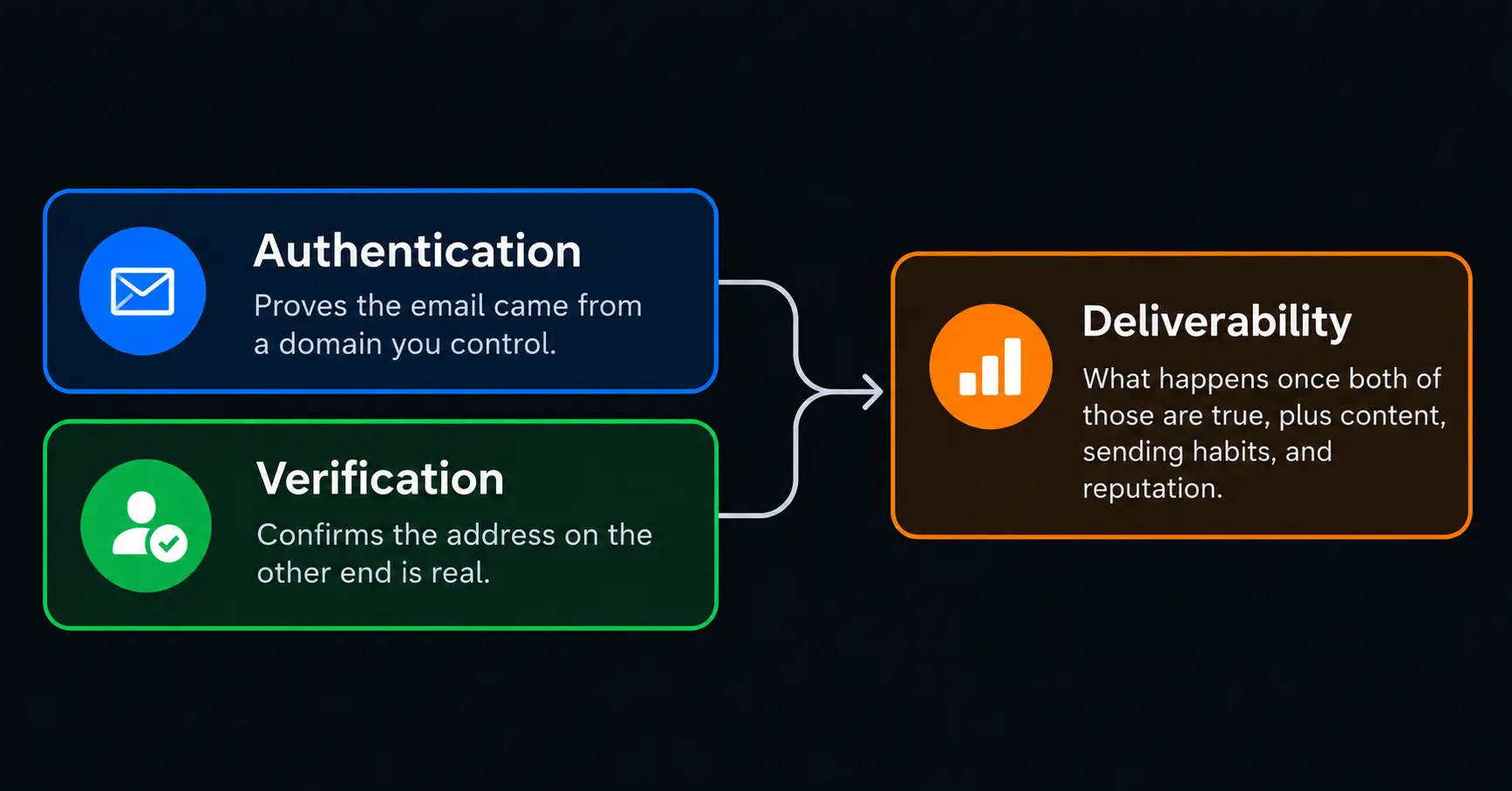
Authentication proves the email really came from a domain you control. Verification confirms the person on the other end is a real, reachable address. Deliverability is what actually happens once both of those are true, plus your content, your sending habits, and your reputation built up over time. None of these three can substitute for the others, and that's exactly what's happening whenever a perfectly authenticated list still lands in spam anyway.
Start with the checklist, and get authentication right first; it's usually the easiest thing to get wrong and also the easiest thing to actually fix. After that, treat your list quality and your content as something you maintain constantly, not a task you finish once. Deliverability isn't a badge you earn and keep forever. It's something you have to keep earning, one send at a time.
More from the blog
Featured Tools
Answer a few questions and get 40 to 60 logo concepts instantly — then buy just the files you need without committing to a subscription.
.png)
Turn a text script into a professional talking-head video with AI avatars in 175 plus languages — no camera studio or on-screen presenter required.
Train an AI on your face and generate hundreds of photos of yourself in any setting outfit or style — no studio no photographer no reshooting.
The AI writing platform built for marketing teams — brand voice enforcement campaign workflows and content that stays on-brand at scale.
An AI assistant built around careful reasoning and long-form reliability — particularly strong for writing analysis coding and working through complex documents.
The AI assistant that started the conversation — still the most widely used and one of the most capable general-purpose AI tools available.
Upload a recording made in a noisy room and download it sounding like it was recorded in a proper studio — completely free and no Creative Cloud subscription required.
Text or image to a PBR-textured game-ready 3D model in under a minute — with auto-rigging animations and plugins for Blender Unity and Unreal in the same pipeline.
Type a prompt and get a full song back — vocals lyrics and instrumentation in under a minute from the AI music generator with 2 million paid subscribers.

Self-host for free on your own server or pay $24 per month for cloud — the open-source automation platform where every workflow is yours to inspect debug and modify at the code level.
The voice quality benchmark for AI text-to-speech — emotionally expressive narration at $11 billion valuation with 3000 plus voices in 32 languages.
Select any region of a photo describe what should be there and watch Photoshop fill it in — professional image editing finally has an AI layer that actually earns its place.
A visual drag-and-drop automation platform where each workflow module is a lego brick — 5 to 10 times cheaper per operation than Zapier for anything with real complexity.
The revenue intelligence platform that records analyses and coaches from every sales call — showing what your best reps do differently and why deals are won or lost.

The AI image generator professionals actually use for artistic and cinematic output — consistent aesthetics polished results and the widest style range in the category.
.png)
An AI support agent that resolves customer queries autonomously and charges per successful outcome — so you only pay when it actually works.
AI-powered video interviewing and assessment platform that screens candidates at scale using structured interviews and behavioural analysis — used by global enterprises for high-volume hiring.

AI-native accounts payable automation that processes invoices codes GL accounts routes approvals and matches purchase orders — trained on over 100 million accounting documents for high no-touch rates.

Free AI tools built right into Shopify's admin for copy, images, and chat
Give it a GitHub issue a Slack message or a Jira ticket and it delivers a working pull request — a fully autonomous software engineer that runs its own environment end to end.